Why read? Here’s one reason.

Charles Blowfavicon New York Times columnist Charles Blow wrote a great personal narrative yesterday that teachers can give to their students to answer the question, “Why read?”

In “Reading Books is Fundamental,” Mr. Blow tells the story of how he became an avid reader and how books transformed his life.

(Note: This article is also at Iserotope Extras!)

Growing up a child of modest means, Mr. Blow remembers skipping over toys and candy and being transfixed by the power of books. With stories, he discovered a larger world outside himself in which he could place his own trajectory. Mr. Blow quotes James Baldwin:

You think your pain and your heartbreak are unprecedented in the history of the world, but then you read. It was books that taught me that the things that tormented me the most were the very things that connected me with all the people who were alive, who had ever been alive.

Later in the piece, Mr. Blow worries that a recent study’s finding that more Americans are becoming non-readers. If the Pew Research Center is correct, nearly a quarter of adults did not read a single book last year.

It’s possible, Mr. Blow concedes, that Americans are reading tons of current events and other nonfiction, whether at their jobs or on the Internet. This is not optimal, he writes. A book — whether in physical or electronic form — is what matters:

[R]eading texts is not the same as reading a text. There is no intellectual equivalent to allowing oneself the time and space to get lost in another person’s mind, because in so doing we find ourselves.

I like that last part: that reading simultaneously leads us outward (toward another person’s mind) and inward (toward finding ourselves).

This year, as the Kindle Classroom Project grows, and as reading cultures build at the three schools where I coach, I observe firsthand what Mr. Blow is talking about.

I see students not just joyful that they’re reading. I also see them mindful. As students read, time and space tend to bend. Students fall into stories, and by doing so, they have an opportunity to write themselves. favicon
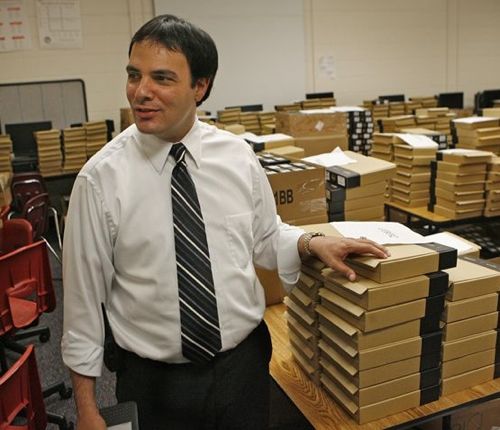
I don’t have as many Kindles as this guy.

favicon I’m very happy with the 127 Kindles that have been donated to the Kindle Classroom Project over the past few years.

But take a look at this guy!

Keith-Mastorides

Keith Mastorides, the principal of Clearwater High School in Clearwater, Florida, made headlines more than three years ago when he purchased 2,100 Kindle Keyboards. Every single student at the school received a Kindle.

Interviewed in this week’s Kindle Chronicles, Mr. Mastorides tells the story of how his school became the first in the country to go all-Kindle. It’s pretty great. Check out the interview beginning at 24:02.

I appreciated host Len Edgerly’s questions, and as a result, I learned a lot about Clearwater’s program.

A few tidbits:

– Each Kindle contains a student’s textbooks, 150 novels, local newspapers, and access to grades and attendance. (It makes me happy that the school combines fiction and nonfiction, and it gets me thinking that I should encourage my schools to allow WiFi access on the Kindles so that I could do the same.)

– Clearwater staff members managed all of these Kindles and ebooks on their own. Amazon’s Whispernet, which organizes and helps deploy content to the devices, did not yet exist. (I find this amazing. Keeping tabs on 127 Kindles is a big job. I can’t imagine 2,100!)

– The biggest highlight of the Kindle program, according to Mr. Mastorides, has been that the lowest-performing students have improved their reading scores the most. (This doesn’t surprise me.)

– Since 2010, the Kindle program has shifted, particularly as tablets have become cheaper and more ubiquitous. Though the school still has some Kindle Keyboards left, Clearwater has shifted to a “bring your own technology” stance, where students can use the device they own. For students who don’t have a laptop or tablet or smartphone, the school offers a Kindle or a Kindle Fire. (I don’t like this approach. As Mr. Edgerly suggests and Mr. Mastorides denies, I believe it creates a two-class system.)

All in all, this interview helped me think of possible next steps for the Kindle Classroom Project. It keeps me grounded on the central mission of the program, which centers on promoting the joy of reading (rather than facilitating the delivery of subject-specific content). And it motivates me to keep thinking about the many ways that Kindles can meet the needs of students in different schools. favicon

Kindlers outperform non-Kindlers again

improvementfavicon I’m excited to report that students who are part of the Kindle Classroom Project outperformed their peers who don’t use Kindles on a recent online reading assessment.

Right before Winter Break, students took a mid-year reading assessment to track their growth since September. In the three months since the beginning of school, Kindlers have raised their reading skills by an average of 0.7 of a grade level. Non-Kindlers went up 0.4 of a grade level.

This doesn’t sound like a huge difference, but it’s 75 percent better! At this rate, Kindlers will go up a total of 1.5 to 2.0 grade levels by the end of the school year, similar to last year’s gain of 1.9 grade levels.

Getting better at reading gets harder and harder in high school. According to research and my experience, it takes four ingredients: (1) a positive whole-school reading culture, (2) strong instruction, (3) voluminous independent reading, (4) effective reading intervention for struggling students.

The Kindle Classroom Project contributes to Ingredients #1, #3, and #4, and that’s precisely why I think the program is working! favicon

Kindle Library reaches 400 titles, more to come

9780316219266favicon With just 12 hours left in 2013, the Kindle Library has reached 400 titles, thanks to a donation from LeAnne in Fremont, Calif.

It took just three months for the library to grow to 400 books from 300.

LeAnne has supported the Kindle Classroom Project for a long time, and I appreciate her dedication and generosity. She’s part of the 15-member cadre of sustaining donors who give and give and give. LeAnne does an excellent job getting books that students want by checking out my students’ Amazon Wishlist.

It’s fitting that Book #400 is The Everything Store: Jeff Bezos and the Age of Amazon, a biography of Jeff Bezos. Daniel, a highly skilled reader who requested the book in October, will be very happy to receive the book when we return from Winter Break next week.

If it took just three months for the Kindle Library to gain 100 titles, what does that mean for 2014? The future road looks promising: Just yesterday, I finally completed a $1,200 DonorsChoose project ($900 after sales tax and DonorsChoose’s fees, ugh) that will fund 90 books that students request. Here’s a screenshot of the completed project. (LeAnne was in on that project, too, along with other key figures Stuart, Laura, DSW, Iris, Michele, and Raman.)

Screenshot 2013-12-31 12.30.59

With those funds, along with the regular generosity of KCP donors, I predict we’ll reach 500 (or maybe even 600?) books by the end of the school year.

But there’s no rush. It’s important, of course, to keep the books excellent. That’s the most important thing. It’s better to have fewer good books than more bad ones. That’s why it makes me happy to say that I’m 100% sure that every single title that’s currently in the Kindle Library is high-interest and compelling to my students.

There’s only one worry I have: What happens when the Kindle Library gets too large? I mean, it’s not going to happen anytime soon. But the last time I checked, the latest Kindles could hold “more than 1,000 books,” according to Amazon’s website. How many more? I wonder. 🙂

Want to get in on the fun? Check out the Contribute Page for 10 ways to donate! favicon

All right, so maybe Digg Reader isn’t perfect

diggiconfavicon A few months ago, I got all crazy and wrote that Digg Reader was better than Feedly. Well, I still stand by (most of) what I wrote — but not everything.

As an aside, the main Digg site — the article generator and curator — is excellent and getting better and better. The editors at Digg choose content wisely. And Digg made a great decision to leave most of its videos on a new separate page. (I like videos, sure, but I came here to read.) Even better is how Digg integrates its reader into the entire experience. The thinking is sophisticated and elegant.

As for Digg Reader, I still think the web experience is cleaner and more beautiful than what Feedly offers. When I’m on Digg Reader, peaceful is the adjective that comes to mind. (Feedly gets the adjective cluttered.)

Unfortunately for Digg Reader, I spend a lot of time reading on the go, which means on my phone. This is where Feedly’s mobile app (at least for Android) is far superior. Like, a lot. Here’s why:

1. When you open up Digg Reader on your phone, you get Digg’s curated articles, not your own. You have to go to a separate screen to get your items. Feedly gives you your articles.

2. When you scroll through articles that you don’t want to read, Digg Reader does not count them as read (either by default or by choice). Feedly does.

3. It’s much harder to scroll through articles on Digg Reader than it is on Feedly. In Feedly, I see several headlines at a time, and when I scroll, an entire new page of items comes up. It’s very snappy. That’s not the case for Digg Reader.

What does this mean for me? As much as I love Digg Reader, I can’t call it my 100% Google Reader replacement. (It’s so funny, by the way, that people were predicting the Google Reader Apocalypse last summer. Things turned out fine, though maybe RSS is dying.) Most of the time, I’m using Digg Reader on my computer and Feedly on my phone. It’s not an elegant solution, but it’s working out so far.

In the meantime, I’ve sent a few emails and tweets to Digg Reader asking them whether they plan on letting users choose a scroll-as-read feature. I haven’t heard back. In this age of excellent customer service, this isn’t the most welcoming news. Despite their imperfections, however, I still find myself using Digg and Digg Reader all the time, hoping for the little improvements that will make things perfect. favicon