The struggle continues after graduation

My 2012 Advisory.

favicon Last night, I had my first post-graduation dinner with my 2012 Advisory at a pizza place in the neighborhood. Thirteen of 18 students showed up. It was great to catch up.

It was the first time the crew had been together since last June. My students care about each other, and so they quickly fell into a group check-in, a routine they’d participated in weekly since ninth grade.

The updates ran the gamut. Here are some snippets:

  • The valedictorian who disliked and dropped out of her elite East coast school, now back at home playing soccer and applying to UCs;
  • The two students struggling at UC Merced, one on academic probation, who nonetheless both say that college is easier than high school;
  • The student who finds himself at City College after a disastrous last year of high school that got him disenrolled from UC Santa Cruz;
  • The two students who chose the military, one of whom is eager for his tour of duty, while the other faces isolation in rural South Carolina;
  • The students who are shining at San Francisco State after participating in a summer program geared to help students transition to college;
  • The student who left her family and is now living with a friend after deciding she could no longer deal with the abuse in her house.

Overall, my students were happy and positive and upbeat. They are great and strong and smart and resilient people. They are doing some great things. They feel confident about where they stand and what their futures will bring.

I am hopeful that they will continue to feel this way. After all, the struggle continues after graduation. Yesterday’s sobering article in the New York Times, “For Poor, Leap to College Often Ends in a Hard Fall,” reminded me that it’s not enough for high schools to provide a high-quality education. Getting across the stage is just one small step, and especially if you’re from a lower-income background, it’s quite possible to do well in high school and then fail in college, even if you have similar academic skills as your richer peers.

If you have time, please read the article and let me know what you think.

As teachers, many of us think that our primary purpose is to serve the students in front of us, those who enter our classrooms every day (and those who are absent). It is. But seeing my graduates the other night and reading that article in the newspaper make me consider expanding my responsibility as a teacher. The school year may end, and students may graduate, but there’s a lot more learning to do, and a lot more struggle, and many more opportunities for mentorship. favicon

Beginning each class with The New York Times

Media_httpwwwascdorga_vvafkfavicon Teachers Sarah Gross and Jonathan Olsen are conducting an experiment: What if we begin each classroom with students reading The New York Times and writing about what they read?

It’s an amazing idea, especially if I teach social studies in the future. I can’t say it’s the best strategy for English-only teachers, though, because it might crowd out the independent reading of fiction (unless you go with little to no teacher instruction). (Ms. Gross writes here in her blog that it hasn’t, though Mr. Olsen says some of the newspaper reading happens in history class.)

Still, I’m really intrigued and impressed — and a bit jealous. Ms. Gross and Mr. Olsen are doing an excellent job encouraging the reading of current events and nonfiction. They’re also getting their students excited about the world and helping them build background knowledge. Their work with The Learning Network is also impressive. And they’re offering one strong model about how teachers can approach the new Common Core State Standards. I look forward to learning more about their journey.

Read the entire article here (or visit Iserotope Extras), and let me know what you think in the comments! favicon

Tips for texting your students

favicon If you’re a high school teacher, you know about the importance of communicating with your students outside of class time.

Maybe you want to send out a reminder about the homework. Or maybe you forgot to say something important in class. Or perhaps you want to check in with a student.

Some teachers set up class websites or use Edmodo for this purpose. Others rely on Facebook or Twitter. And many teachers still email their students. The problem with all of these methods is that there is no sure way to know that your students have read your message.

That’s why texting remains the best way to communicate with your students. Cell phone ownership is nearly universal, and most students have unlimited texting plans. Plus, in my experience, students do not mind receiving texts from their teachers. You can be fairly sure that your message will read its destination.

Nevertheless, it is important to follow some basic tips before deciding to text your students:

1. Make sure it’s OK with your school and your students.
Some schools don’t allow contact — particularly if it’s teacher-initiated — between students and teachers outside school hours. So it’s best to check with your administration first. Once you get the go-ahead there, it’s also very important to ask your students (and perhaps their parents) for permission to text them. You should also make clear that it’s not mandatory to be on the texting list (though it’s the best way to stay in touch).

2. Use Google Voice as your contact management system.
There are many ways to keep track of all your students and their phone numbers, but the easiest and fastest way is by using Google Voice. You add contacts and organize them into groups. Plus, your Google Voice number gives you some separation and privacy between your work and home lives.

3. Use SmashText as your group texting service.
Google Voice lets you text five people at a time, so in order to text all of your students at once, you’ll need to use a group texting service. My favorite is SmashText, an excellent and free program by Matthew Despain. It syncs with your Google contacts and groups and lets you text whole classes (or even all of your students) all at once.

SmashText has many great features. For example, you can text an entire class at once or choose specific students within a class. This is great when you want to send different texts to different students (e.g., absent students, students who didn’t complete homework). Even better, the program allows you to include a student’s name in an otherwise generic message. After all, people prefer a personalized message over a generic one.

The only limitation to SmashText is that it is currently available only on PC.

4. Teach your students about the different types of texts you’ll send — and what you expect from each type.
This is the most important tip. Sometimes, you just want to send out information and don’t want a response back. But other times, you might want your students to reply. Say that you want to make sure that a student feels confident about the next steps of an essay. So you write a personal text, ask a question, and get nothing back. Then what? Try again? Forget about it? Or is there a better way?

I’ve found that the more I am clear with students about the way I communicate (and what I expect from them), the better my students reciprocate. Here are my three types of texts:

  • Alerts. These will tell you some important information. Read them carefully. You don’t need to respond, but you can if you like.
  • Personal message. These will include your name. I encourage a response, but if you don’t want to respond, that’s fine.
  • Personal message with question. These will include your name and a question. I expect a response back as soon as possible.

I know this level of specificity sounds a bit over-the-top, but I’ve learned that unless I’m really clear, students will either over- or under-respond. (Another option is to include NNTR, no need to respond, or PR, please respond.)

5. Text sparingly.
Truth be told, I got a little carried away last year. SmashText was so great, and my students appreciated my texts so much, that I began to text too often. This was bad because it created a dependent dynamic; for example, students didn’t need to pay attention to the homework because they’d likely receive a reminder at night. It’s important to limit texting only to emergency alerts and one-on-one communication. Other non-pertinent information — like homework or daily class activities — is best left for a class website.

If you follow those tips, you’ll have success with texting your students, and they’ll feel supported and appreciative of your communication.

Do you agree with these tips? What other suggestions do you have? favicon

Welcome, Kindle #18!

favicon Kindles are coming in quickly now!

I’m very happy to announce the arrival of Kindle #18. There it is, inside its cute green case, over there on the right!

This Kindle Keyboard is the 18th Kindle in the fleet and the sixth in the past two months.

I’m even more impressed about how it got here. Sarah from Petaluma found out about The Kindle Classroom Project online (thank you, Google!), filled out the easy-to-fill-out form on the new KCP page, and shipped the Kindle over to me in a jiffy.

The card was a great touch. Thank you, Sarah, for thinking of ninth graders and their reading lives. I’m appreciative that you chose us as one of your #26acts.

The Kindle-giving pace is definitely picking up. People are donating and telling their friends. I’m finding out that word-of-mouth has been instrumental in this latest wave of donations.

In addition, more and more people are switching over to the Kindle Paperwhite or the Kindle Fire and wanting to do something good with their old Kindle. (I am hopeful that this trend continues after the Christmas season!)

For all of this generosity, and for all of these efforts, I am very thankful. I never thought that I would be able to offer a second classroom of students access to Kindles this year, but it’s likely going to happen in January — maybe at the school where I coach, or perhaps as part of an after-school reading club at my former school in San Francisco.

If you have thoughts or ideas, please let me know! favicon

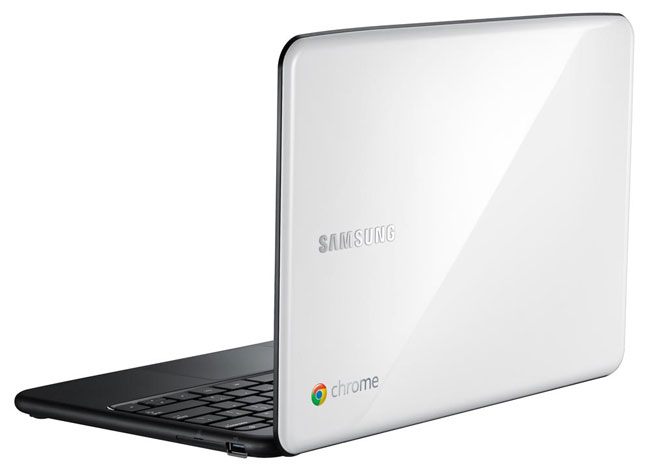
2 days, 22 Chromebooks

favicon Things got a little crazy last week when Google announced a partnership with DonorsChoose to offer teachers up to 30 Chromebooks for $99 each.

I learned about the deal — thanks, Google Reader! — between coaching meetings, quickly signed up, and emailed the offer to my colleagues and teacher friends.

And then mayhem ensued.

Within a few hours, hundreds of teachers (728 to be exact, according to Google!) requested thousands of Chromebooks. The system was overloaded, and DonorsChoose had to shut the offer down.

In the meantime, however, I was lucky enough to write proposals for two projects:

  • 20 Chromebooks for a Math teacher to promote blended learning with Khan Academy,
  • 2 Chromebooks to pilot a study on increasing homework completion.

Yep, it took me less than an hour to write these proposals and less than two days for people to fund them. The total amount donated: around $2,800.

The unfortunate news — and the part that makes me a bit frustrated — is that many hardworking teachers did not have the chance to apply for this amazing deal because, well, they were teaching. This is the part that Google and DonorsChoose got wrong.

I mean, I can’t fault them; after all, many teachers received many Chromebooks, and many students will benefit. But it’s too bad that some people got lucky (because they were on a prep that period, or because they were sick that day, or perhaps they were at their desks during a test) while others didn’t. favicon