5 reasons Digg Reader is better than Feedly

diggiconfavicon Like most people, when Google Reader closed in July, I gravitated toward Feedly as its replacement. Feedly had a plan to migrate Reader users over to its service, plus its phone app was beautiful. I was sold.

But then came the bad news. Feedly was often over capacity. It liked to make me sign in again. And it was sometimes slow.

So that got me trying out Digg Reader. I’m really happy with it. It’s now the reader I use and recommend. Here are some reasons why:

1. It’s faster and easier.
Signing up takes two or three clicks. Once you’re in, the interface is simple to use. There aren’t tons of features. Everything just makes sense. When you click through your list of items, there’s no lag. It’s even faster than Google Reader used to be.

2. It has a calmer look.
There is sufficient blank space. Nothing is cramped, and there aren’t random unnecessary doodads cluttering up the screen. The light blue color is pleasing to the eye. The settings are easy to change, and it’s simple to organize your feeds. Nobody wants to stress out while reading their reader items.

3. Its keyboard shortcuts are as good as Feedly’s.
You’ll want to get through your items quickly and save or share the ones you like. I’m not sure why readers aren’t investing more of their effort into developing better keyboard shortcuts. For example, both Feedly and Digg allow you to save an item by pressing “s.” But Feedly doesn’t let you email an item, whereas Digg does. On the other hand, Digg does not let you share an item, while Feedly does (to Buffer).

Unsolicited advice for Digg Reader: “f” should share to Facebook, “t” to Twitter, “g” to Google+, and so on.

4. It saves directly to Pocket.
I’m a huge Pocket user, and Digg lets you save items directly to Pocket. That’s so much more convenient than having to set up an IFTTT recipe, which I had to do with Feedly.

5. It’s connected to Digg.
Digg is making a major comeback, and the site’s content and design are top-notch. If you find something on Digg that you want to read later, all you have to do is save it, and it appears in your Digg Reader.

* * *

So yes, I prefer Digg Reader, and I recommend it to others. But I find myself unable to get rid of Feedly entirely and currently check both Digg and Feedly. This is cumbersome and awkward, so why can’t I commit completely to Digg?

The big reason is that Digg doesn’t yet have an Android phone app, plus Feedly’s is spectacular. I mean, if you’re a phone person, there’s no reason ever to visit the Feedly website. Just stay on your phone and bask in the Feedly glory. It’s one of the best phone apps out there. (I think it has more features and is more powerful than the website.) Digg said that an Android app was coming out by the end of the July, but it’s not here yet. If it’s half as good as Feedly’s, I’ll be happy.

I’m also fascinated by Feedly’s various list views. Digg gives you two choices: list or expanded. Feedly gives you bazillions (or at least five): titles, magazine, timeline, cards, and full articles. Sometimes, when I use Digg, I get a bit jealous. But didn’t I mention that Feedly is extra slow?

Finally, at least right now, I like that you can add a feed to Feedly the old-school way, by clicking on a site’s RSS icon. This takes a few seconds to set up, but at least you can do it with Feedly. I haven’t yet figured out how with Digg.

Once Digg delivers a workable Android phone, though, I’ll be all set. But I also understand why many people prefer Feedly. Which RSS reader are you using? Do you have a favorite yet, or are you still mourning the loss of Google Reader? favicon

The new Diigo is a major improvement

newdiigologofavicon I’ve liked Diigo for a long time. (Here’s a post from 2009 and another from 2012.) In fact, I used to be (a tad) obsessed with Diigo.

But then, something happened, and Diigo wasn’t being developed as consistently, and I lost interest as glitzy social clipping services like Pinterest and Snip.it and Bundlr and Scoop.it came along and made Diigo look so, well, ordinary.

But now, I’m happy to report, Diigo is back. And so am I.

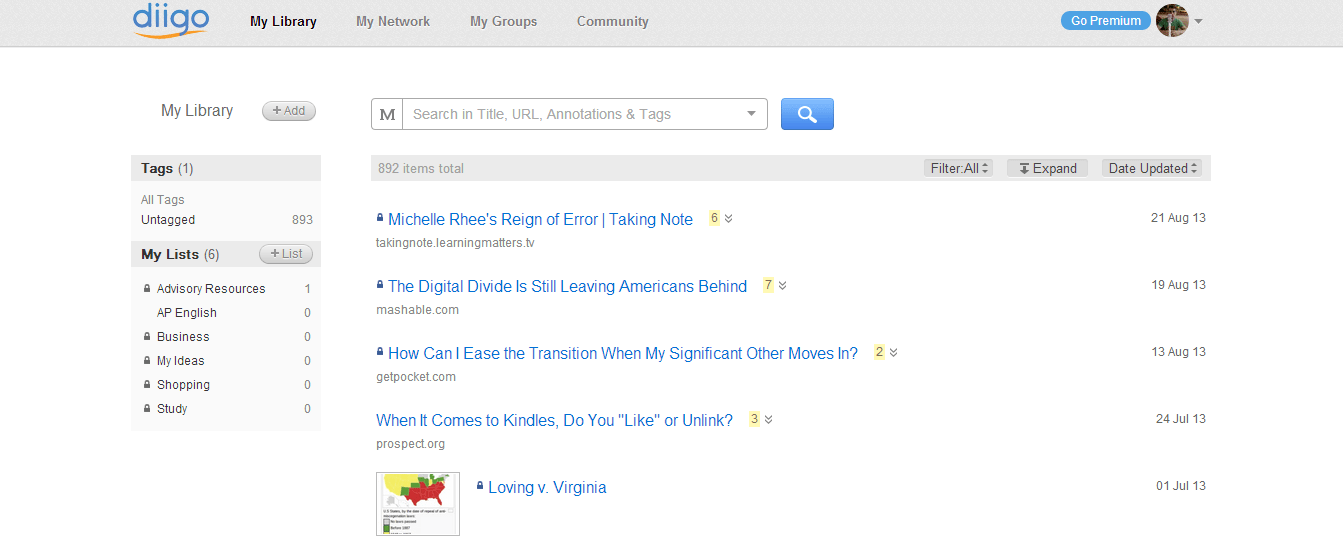
Most impressive is Diigo’s site redesign. It’s a major overhaul. Gone is the clutter. The look is clean and clear. Here’s my library dashboard:

Diigo Screenshot


If you take a closer look, you can tell that the developers took extra care with details. For example, the number of annotations for each clip is highlighted next to the title. You can expand or collapse your annotations.

Better yet, the new search bar works extremely well. The default (see the M?) is called “Meta Search,” which locates search terms both in post titles and annotations. It’s so good that I made the big decision to get rid of tags altogether. Tags weren’t helping me organize my clips very well, and I figure that I can use Diigo lists if I want to curate and save a “best-of” collection. If you don’t like the Meta Search, you can also search by tags or by full text (if you have Diigo Premium.)

Diigo has also improved its already-excellent Chrome extension. Seriously, this is one of the most useful extensions out there. Here are some of its features:

  • Save a webpage to Diigo,
  • Annotate a page,
  • Save the page to read later (I prefer Pocket),
  • Take a screenshot (genius),
  • Share the page via Twitter, Facebook, Google+, Gmail, or an annotated link.

I can’t say enough good things about the extension. No other service allows you to annotate the Internet as smoothly as Diigo does. Once you start highlighting or taking notes, up comes the “Annotation Toolbar,” which lets you change the highlight color and write a sticky note. Or you can reorganize the clip by changing the title, adding tags, and sharing to a list or a group. (I could do an entire post just on these features. Yeah, maybe I will!)

As a teacher, the only problem I see with Diigo is that I don’t see it working seamlessly with students (despite Diigo’s “teacher console,” which makes it easy for teachers to create and manage class groups). It’s just a little too advanced and too text-heavy. Once students get used to reading and researching a lot (maybe in the 11th and 12th grades?), they probably would see the many benefits of Diigo. But because Diigo lacks a strong phone app (particularly on Android, where Power Note is only mediocre), it just won’t fly with the average student. Students (and many adults) are too attracted to big and beautiful images, and though I don’t want Diigo to emulate Pinterest, it wouldn’t hurt to move at least a little in that direction.

I can’t wait to see where Diigo heads next. It has tons of users and a huge amount of potential. In the meantime, I’ll be playing around with Diigo, experimenting with it, and doing a whole lot more highlighting and annotating. If you use Diigo or try it out, please let me know what you think! favicon

Try out the new commenting system!

commentpencilfavicon One of my goals this year is to deepen and widen the conversation on Iserotope. There are tons of excellent educators reading the blog, so why not have a dialogue?

Don’t worry, non-educators: You’re invited, too. Please don’t be shy!

After some thought, I decided to change up the commenting system just a tad. You might not even notice the changes, particularly if you’ve been too reticent to comment in the past. But rest assured, it’ll be a little easier to get your thoughts out there than before.

Here’s how:

1. Go to the comments section. There are two ways: Click on the title of the post and then scroll down to the bottom. Or, if you’re on the main site, find the little thought bubble and click the link to its right.

2. Write your comment. There will be a box with the prompt, “Enter your comment here.” That’s where it goes!

3. Identify yourself. We don’t want random people or spammers in our conversation. There are two ways to identify yourself: Leave your email address and name OR sign into your Facebook, Twitter, or WordPress account by clicking the icon of your choice.

4. Submit your comment. Just click on “Post Comment.” Easy as that!

5. Advanced: You can also stay in the conversation by clicking the box next to “Notify me of follow-up comments via email.”

* * *

For the blogging geeks out there, I decided not to go with a third-party commenting service (like Disqus or LiveFyre). Those sometimes slow down your site. And even though I was tempted, I stayed away from Facebook. Maybe you don’t want to be forced to log into Facebook to share what you think on Iserotope.

Anyway, for some people, this post means very little. But I do want to encourage everyone to feel free to share your ideas. Also, don’t forget to check out Iserotope Extras and comment on the articles there.

And for those of you who get these posts via the Iserotope Facebook page and like to make comments there, by all means, please continue! It doesn’t really matter where you share your ideas, as long as you feel comfortable doing so.

If you have any questions or concerns or worries, please let me know! You can even leave a comment if you like! Go ahead, it’ll be fun. favicon

Where Iserotope is headed this year

favicon Over the years, Iserotope has covered a number of topics: teaching, reading, technology, and more. Last year, when I left the classroom to become an instructional coach, the blog shifted to focus on the Kindle Classroom Project.

I got very excited that so many people wanted to donate their Kindles that I made sure to keep everyone updated about the progress of the project, which has grown from 12 Kindles last November to 69 now.

This year, I will continue to build the Kindle Classroom Project — the goal is now 125 Kindles, enough for the entire ninth grade class at my new school. But I also hope to write more posts about teaching, this time from an observer’s point of view rather than from my own.

Being a coach is very different from being a teacher. You have a distance that makes you farther away, but because the minute-by-minute stress isn’t there, it’s also possible to see more clearly sometimes.

I feel like it’s important for me to tell more stories about what I’m seeing in the classroom. This is partly to counteract some of the prevailing narratives that we’re hearing on news shows or reading in newspapers.

Specifically, I want to focus on high school teachers who are trying to teach reading better. What do they try, and what’s working? Are there teachers who can communicate to students not only the importance of reading but also its complexity? Do students have a fixed mindset about reading, or are they open to improving?

Elementary and middle school teachers and instructional coaches are doing a good job, in my opinion, of keeping reading at the center of their practice. By high school, though, that emphasis goes away, and the unfortunate assumption is that students either know how to read by then or, well, too bad. That, of course, needs to change.

In addition to focusing on teaching and reading, I’d like to hear from you, Iserotope readers, about what you’d like to read about. So please let me know! It’s going to be a great year. Hope you join me in the journey! favicon

“I finally finished a book.”

favicon There’s plenty of (circumspect) joy in this 30-second clip. It’s from May, and it’s a brief interview of a ninth grade boy from San Francisco. Please watch.

What do you notice? I think the student is expressing even more with his body language and facial expressions than he is with his words.

This little video gets me thinking of so many things. Most immediately: The joy of independent reading vs. the drudgery of teacher-assigned reading. The gap between where our students are and where they need to be. And, the absurdity of the Common Core as it currently stands.

Please leave a comment! (I’m trying a new commenting system. But make sure to uncheck the box if you don’t want your thoughts reposted on Facebook or Google Plus!) favicon