Sue Hee (San Francisco, CA) donates 2 Kindles to the #KCP. That makes 158 in all. Thank you, Sue Hee!
— Mark Isero (@iserotope) July 30, 2014
Go ahead, follow me on Twitter! Or contribute to the Kindle Classroom Project! 
Sue Hee (San Francisco, CA) donates 2 Kindles to the #KCP. That makes 158 in all. Thank you, Sue Hee!
— Mark Isero (@iserotope) July 30, 2014
Go ahead, follow me on Twitter! Or contribute to the Kindle Classroom Project!
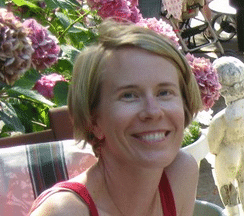 There she is! It’s Michele Godwin.
Because of her total awesomeness, you likely already know about her.
But just in case you don’t, I can let you in on a few secrets. Michele is an extraordinary English teacher and reading advocate and former colleague and great friend and overall upstanding person. Plus she’s funny, which I like.
Michele is also the founding librarian at Leadership High School in San Francisco. Yes, that’s the incredible school where I taught for 12 years. It makes me very happy that the folks at LHS, including Principal Beth Silbergeld, are investing significant resources into building a library. And it makes me even happier than Michele is at the helm.
This summer, Michele has been hard at work. Here are a few highlights:
+ She has raised thousands of dollars. Her plan on the first day of staff development is to surprise — Oprah-style — the teachers at LHS with starter classroom libraries. It’s going to be a little like when Oprah gave away free cars. Remember?
Michele is going to do something like this, except she’s going to point at the audience and jump up and down and say, over and over again, “You get a classroom library! You get a classroom library! Everybody gets a classroom library!”
+ Michele is spreading the news and getting people excited. She is tweeting at @readlhsbooks (please follow her!), posting on Facebook at the LHS Books Facebook page (go like it!), and writing book reviews over at Goodreads (go check it out!). Here is an example of one of her tweets:
Excited to be working on this library endeavor with @birdandbeckett. Supporting local business AND building readers! #lhssf #donatelhsbooks
— LHSBooks (@readlhsbooks) July 26, 2014
(And yes, she’s partnering with a local independent bookstore!) Perhaps even more exciting, Michele has launched the LHS Books website, where you can read her latest blog posts, find out what’s in the library (coming soon), and most important: make a donation. Hey, why don’t you make a donation now? Don’t you think so?
Did you make a donation? I hope so!
+ Here’s my favorite thing that Michele is doing: She and I are teaming up on the Kindle Classroom Project! (Michele is also a sustaining donor of the project.) Together we are going to distribute at least 60 Kindles to students grades nine through twelve.
(Nobody knows about this yet, so please keep it a secret. 🙂 )
We’re going to select the lucky students, give them a Kindle, tell them how much we want them to read, follow their reading progress, figure out which books they like, let them request books that aren’t currently in the Kindle library, and make the other students who don’t yet have Kindles jealous.
(Then those jealous students will clamor for Kindles, and we’ll ask for more donations, and we’ll raise more money, and maybe every student at LHS in 2015-16 will get a Kindle!)
* * *
So there you have it: Michele Godwin. Don’t you like her? Wouldn’t you agree with me that she’s impressive? I thought so!
Please say hi to Michele in the comments!
 Summer is a great time to reflect, take stock, and figure out next steps for the Kindle Classroom Project. Because so many of you are generous donors to the project, and you like to know what I’m doing, I just wanted to write a few of my ideas so that you know what I’m considering.
First, the things that definitely will be happening:
1. In just a few weeks, the 156 (and counting) Kindles will be in five schools: City Arts & Technology High School (San Francisco), Leadership High School (San Francisco), Envision Academy of Arts & Technology (Oakland), REALM Charter School (Berkeley), and Impact Academy of Arts & Technology (Hayward).
2. Like last year, I’ll be working with excellent teachers and administrators who care as deeply about students and their reading lives as I do. The list is not final yet, but some of those educators include Marni Spitz (CAT); Michele Godwin, Beth Silbergeld, and Kathleen Large (Leadership); Nancy Jo Turner (REALM); and Tess Lantos and Abby Benedetto (Impact).
Next, the things that most likely will be happening:
1. The 501-title Kindle Library will be organized by genre and available online on Iserotope for teachers, students, parents, and YOU! to view. This is going to be an important step for book browsing and discovery.
Up until now, students had access to all the books in the Kindle Library, but there wasn’t a very good way for students to browse. Sometimes they’d find a new title by window shopping the classroom library, none of which yet contain a truly mirrored experience of all 501 Kindle titles. Other times they’d get recommendations from their teacher or their friends.
If I work hard, I can get the new Kindle Library catalog up and running before the first day of classes. It’ll be a major improvement.
2. Students from all five schools will log their reading on one unified Google Form. This will help me gather important data. For example: who’s reading a lot vs. a little, which books are most popular, and whether the Kindles are making a difference.
Up until this year, I have had a good sense of what students were reading, but the process wasn’t always simple and streamlined. Now everyone (including YOU!) will be able to look at the reading progress of students. (Don’t worry: No last names will be published.)
Finally, the things I hope will be happening:
1. My first hope is to tell more stories, involve students and teachers more in those stories, do some interviews, and overall do a better job documenting the successes of the KCP. It’s time that YOU! get to experience all the good news that I get to experience every day.
To that end, I am excited to announce that I will be inviting my collaborating teachers to become guest bloggers. Whether they write just one time or regularly, I think it’s absolutely essential to get their voices out there. For teachers who are too busy or shy to write, I’ll be sure to encourage them to do video and audio interviews.
And why stop at the teachers? Wouldn’t it be great to meet some of the Kindlers? I think it’s time. If I get the appropriate permission from schools and families, I would love to put more student stories up on Iserotope. That could be posts, pictures, interviews, and even a short documentary video (if someone will help me, of course).
2. My second hope is to be able to answer the question about whether the Kindle Classroom Project should remain a little project or grow into something larger.
I won’t go into too many details right now about this possibility (because it’s exciting and scary), but I will say this: I’ve seen the positive impact of the Kindle Classroom Project, and that makes me happy. Because of your generous support, hundreds of students in the San Francisco Bay Area have reconnected to the power of story and reclaimed their interest in reading.
But there is also more work to do. Students of color in urban schools should have easy and plentiful access to books. The books should be high quality and help students see themselves, who they are, and who they want to become.
And though there are may ways to achieve those goals, it makes a lot of sense, given the limited resources of urban public schools, to build hybrid classroom libraries that mix Kindles, e-books, and physical books.
Please let me know your thoughts!
 Today I was doing some number crunching, and I calculated that the Kindle Classroom Project costs about $40 per student per year.
The money, donated by generous contributors, goes to maintaining the 156 Kindles and to building the 501-title Kindle Library via student requests.
But if you ask a student, they’d tell you a slightly different version of where the money goes.
This is what they’d say:
+ The money lets them read whatever book they want whenever they want wherever they want. Students get to take their Kindle home with them.
+ The money lets them reclaim their love of reading. Students read an average of 18 books last school year on their Kindle.
+ The money lets them learn about themselves and the world without depending on others. Students have access to 500 high-quality books.
+ The money tells students that adults care about them and their reading lives. Students want adults to believe in them.
I am asking you to join the Kindle Classroom Project by making a $40 donation to help a student reclaim their love of reading in 2014-15.
Would you like to?
If so, the easiest way is via PayPal, though there are many ways to contribute. Please click on the button below and make a generous donation.
Thank you for reading this post, and thank you for your contribution. Please feel free to leave a comment or a question.
Update: There have already been 4 donations to support students and their reading lives. Thank you: Nick and Dina (Saratoga, CA), Michele (San Francisco, CA), Kate (San Francisco, CA), Sarah (San Carlos, CA), Daniel (San Francisco, CA), and Laura (San Francisco, CA). I’ll try to keep this updated!
 Today I’m back with a new installment to the “Get Your Students to Love the News,” which I think is slowly becoming a great resource for teachers. Today is the seventh installment. When you have time, be sure to check out the other posts, too.
So far in the series, I’ve avoided reviewing “news aggregators,” which collect articles from various sources based on user interests. After all, as I’ve written about, you want to make sure that your students understand that news comes from real people and real news organizations and not randomly from the air.
Once that’s solid, it’s OK, I think, to move to news aggregators because students can choose topics they’re passionate about and then follow them over time.
There are a ton of good aggregators, including Flipboard and Zite (which Flipboard acquired earlier this year). Flipboard is the most popular, and a lot of people like it, but I don’t, mostly because of its user interface, which involves, well, a lot of flipping. Zite used to be my favorite, but since its acquisition, I’ve been checking out News360 and am pretty impressed.
News360 has a website but looks better on tablets and phones. As I’ve said before, for students, the phone is where things happen.
To get a sense of what News360 does, consider its tagline: “Everything you want to read.” In case that’s confusing, News360’s website tells you directly the purpose of its service: “News360 is an app that learns what you enjoy and find stories you’ll like around the web.” OK, I get it. But what does that mean?
It means you first select topics you’re interested in, and then News360 goes and finds articles for you. You can choose topics large or small, specific or generic, local or international. For example, I’m following Music, Movies (both general), Running, Literacy (a bit more specific), and Amazon Kindle (very specific). You can also follow news organizations (like the New York Times), but I don’t think that’s best practice for a news aggregator, whose purpose is to offer new articles from sources you may not read.
After you choose your topics, you get a feed that looks like this (on your phone):

So that’s pretty good. But the best part comes once you start reading articles. You can vote an article up or down, and magically, News360 learns about your interests and gives you more or fewer of those kinds of articles based on your vote.
Let’s take a look at the Jon Bon Jovi article to see what it looks like:

See the thumbs-up and thumbs-down icons? The power to determine whether or not you view more articles about Mr. Bon Jovi is entirely in your fingers. (Additionally, you can share the article with a friend — or save it to your Pocket — using the share icon.)
But also take a look at the tags above the article’s headline. Let’s say that reading about Mr. Bon Jovi has really inspired you to learn more about opera (not exactly sure about why that is, but please go with it). Pressing on that icon leads you to this screen:

Yep, here you have more articles about the opera — and, by pressing on the + button up top, the ability to follow that topic, too.
These two features of News360 — voting articles up or down, and adding topics as a result of reading an article — offer you a nice balance of sometimes refining and sometimes expanding your reading interests.
Plus, News360 looks good, is simple to use, and I think will appeal to students. It’s not anathema like an RSS reader (Feedly, Digg Reader), but it’s also not too-serious = boring.
* * *
Using News360 with Your Students
I can see a lot of ways that teachers can use News360 with their students. Here are a few. Please add more in the comments!
1. Research can be fun.
Research shouldn’t be boring. It should be about following an interest over time and learning more about it. Sure, when students have to write a research paper, then things get serious again — with collecting evidence, paraphrasing, making sure you’re not plagiarizing, and citing your sources. But in the preliminary phases, it’s all about reading a ton. An app like News360 can help teachers send that message to students.
2. Current Events Roundtables.
One frustration teachers tell me about is that students may not have a wide sense of the news. To combat that problem, teachers can require students to follow a small number of topics on News360 and then select one article to share with a small group. This can be done jigsaw-style, where each member of the group has a different topic.
3. Philosophical Discussions about the Internet Filtering Effect
So News360 is one of many services that offer its customers an individualized, personal look at the world. To some extent, most online services do something similar. What’s in our Facebook and Twitter feeds, for example, is determined by whom we follow. I read Eli Pariser’s excellent book, The Filter Bubble, a few back, in which he argues that all this online filtering threatens democracy. What do students think? Engaging them on this topic may also encourage students to think about how they gather and interact with news.
All right, that’s all for now. I hope you enjoyed this installment of “Get Your Students to Love the News.” There are a few more posts left, including a doozy, so please stay tuned.
Also, I’d love to hear your thoughts about News360 in the comments, if you like! Do you think news aggregators are good for students and their news reading lives, or are they a sacrilege to journalism?