Promote nonfiction independent reading with Snip.it

favicon The era of teaching nonfiction reading is here. So says David Coleman and the Common Core State Standards.

If that’s true, then we must create space for nonfiction independent reading. In the same way that students must choose their own novels if they’re going to care about fiction, they must select their own articles if they’re going to care about nonfiction.

English teachers, don’t fret: I don’t expect you to add on nonfiction independent reading to your docket. Get ready, social studies teachers: This one is for you.

I propose that a significant part of every social studies class is an emphasis on current events. But instead of the traditional means of accomplishing this outcome — having students clip newspaper articles once a week, willy-nilly, and then share them — using technology might be a better way to go.

Snip.it — which I use for Iserotope Extras — is a great way to collect articles into collections. It’s a curation service that looks good and is easy to use.

Here’s how it would work:

1. At the beginning of the year, you set up collections based on your curriculum or your categories of interest. This makes it easy to prevent students from clipping articles that are random or not based on your units of study.

2. You then set up a class account at Snip.it and teach students how to use it, including how to install the Google Chrome extension. Yes, you could also have students create their own accounts (and their own collections), but I’d recommend that only if you have a 1:1 environment or teach a current events or global contemporary issues class.

3. Students then clip articles and have a conversation. What’s neat about Snip.it is that it forces the user to write comments to share their viewpoints about the content they clip. That means that you can have your students write a summary and a reaction to the article. Even better, the service encourages other people to comment, too, so you can have students reply to their peers’ articles, too.

The clean design (which some people say is a more serious version of Pinterest), I think, is attractive to teenagers. Take a look. Here’s part of a screenshot of Iserotope Extras.

It’s crucial that social studies teachers involve their students in more reading. As Kelly Gallagher argues, we need to help young people to build background knowledge about their world. There are many ways to do this — including having newspapers and magazines in the classroom, right next to novels — and Snip.it is a great way to keep everything organized and looking tidy. Let me know what you think!

Update: Snip.it cares about fiction, too! I just received an email from Snip.it — they’re donating a Kindle to the Kindle Classroom Project! Very cool. favicon

A Kindle casualty

favicon I am very sad to report that Kindle Keyboard #4 has become “unresponsive,” Amazon’s euphemism for “broken.”

This means we’re back down to 14 Kindles.

The good news is that there is a rumor that one or two more Kindles will be arriving relatively soon. I’ll keep you updated.

Update: An Amazon representative (on my third try!) has just informed me that I would receive a replacement Kindle free of charge! favicon

Building calm in the classroom through meditation

favicon Frazzled. That’s the way I describe most urban public high school teachers at the end of October.

You’re tired, and you’re behind, and you have so much to do. Plus, your students are insane. Quarter grades just came out, resulting in various manifestations of anxiety. And there’s Halloween and a World Series parade tomorrow. It seems like everything is designed to distract and disrupt.

Last year, I felt the same way (and it wasn’t even a tough year!). In “Can I Get a Little Quiet?” I argued that quiet is so rare in schools that many teachers give up seeking it. But a sense of calm benefits everyone, even extroverts and kinesthetic learners.

That’s why I’m happy this year to see teachers promoting quiet in their classrooms. A few teachers employ an “opening song” at the beginning of class. For one minute, students sit in silence, listen to a song (usually instrumental) of the teacher’s choosing, look at the lesson objective, and think of an intention for the day.

Kevin Brookhouser, a teacher I respect, begins his classes with 60 seconds of silence. Take a look. (I secretly like the bell.)

In fact, meditation and other forms of “mindful breathing” have become popular across the country over the past few years. A good friend and former colleague leads her students in guided breathing exercises. Quiet Time, promoted by the David Lynch Foundation, offers schools in San Francisco training to practice transcendental meditation so that students suffering from trauma, stress, and other behavioral issues like ADHD can find more calm in their lives.

As a teacher, I’m leery of such programs (take a look at the “Room to Breathe” trailer; it gives me the heebie-jeebies), but I do appreciate the efforts to provide young people a safe environment to monitor themselves and their feelings. After all, students cannot learn if they don’t know what to do with the distracting and challenging thoughts that are bombarding them.

What I’d like to see more is quiet during lessons, not just at the beginning or end. There’s nothing wrong, for example, with silent reading and silent writing. Of course, student talk should also pervade the classroom, especially when it adds to the academic discourse. Talking just to talk doesn’t always lead to calm.

Please let me know what you think. Should teachers give time for focused quiet? Is meditation going too far? favicon

Meet Kindler #1: Shanesha

favicon The Kindle Classroom Project is going well.

This year I’m teaming up with a teacher in Oakland who is as passionate about independent reading as I am. He’s got a great group of ninth graders reading every day, and the results are good so far.

I’m happy to announce a new feature at Iserotope: Meet the Kindlers. Each week, I’ll be introducing you to one of the students in this year’s Kindle Classroom. Here goes.

Shanesha is 14 years old, lives in Oakland, and is excited to be part of the Kindle Classroom. If you asked her last year about reading, she would have told you it was “stupid.” “I didn’t like reading,” she said, “but that’s because I never could pick the books.”

Now things have changed. Shanesha likes choosing what to read and has already completed two books this year. Now she’s reading Perfect Chemistry, by Simone Elkeles, a favorite among girls.

Shanesha said she was drawn to the Kindle because of its selection (the 130+ titles “are actually good,” she said) and its built-in dictionary. When she doesn’t know a word, she can find out its meaning quickly instead of using a dictionary or staying confused.

First quarter grades went out, and while Shanesha is satisfied with her 3.5 GPA, she knows that she must do better if she wants to get accepted to UCLA or Spelman College, her top two college choices. Right now, though, the primary purpose of reading is not for any long-term goal. “It’s just fun,” she said.

Please leave a comment or question for Shanesha!

* * *

I’m excited about where the Kindle Classroom will go this year. In a weird way, it’s almost more exciting when the participating students are not my own. It’s like they’re wondering, Who is this guy with all the Kindles who’s willing to buy me books I want? And it underscores my belief that all young people like to read.

Stay tuned for next week’s edition of Meet the Kindlers! favicon

Surface and Chromebook: Big week for classroom devices

favicon Now we’re getting somewhere.

Last month, I wrote that there’s no perfect device for students in the classroom. Laptops (whether Apple or PC) are too bulky. Tablets (whether the iPad or the Nexus 7) aren’t good for content creation. And Chromebooks, at $20 per month per student to lease (or about $450 to buy), offer too little computer for too much.

But this week, things are going to change.

Google and Samsung are announcing a new Chromebook, and this one I can see in students’ hands. Cloud computing — especially with Google Apps at the center — makes sense in the classroom. The computer is not as sleek as the MacBook Air, but it’s nearly as light (2.5 pounds vs. 2.38 pounds), which is a must for students. After all, you don’t want to lug around a behemoth. The battery is a respectable 6 1/2 hours, plus you get 100 GB of free online storage. Better still is the price: $249. Just $50 more than the Nexus 7, the Chromebook is the perfect blend of cheap and functional. The only big obstacle is that schools need a strong wireless connection, which is a major investment. But I’m hoping that the Chromebook’s pricetag will encourage more schools to build Wifi infrastructure. I’m also hoping that Google will reduce its per-month leasing option; $20 a month is unnecessary.

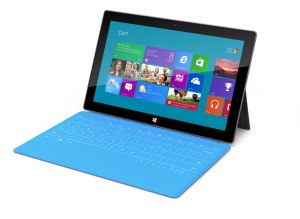
There’s another big tech development this week: Microsoft is launching the Surface. In my opinion, this tablet is the most exciting new product of the year. Not only will the Surface be a fully-fledged computer (running Windows RT), but its innovative kickstand and touch cover feel like something Apple would do. This device is perfect for the classroom: It’s a tablet and a computer all in one. It’s playful and colorful. It’s new.

That is why I am disappointed about the Surface’s price. The tablet without the touch cover (a necessity in schools) will run $499. The touch cover will cost an additional $120. That’s just too much.

(If the tablet and the touch cover both cost $499, schools would go crazy.)

But the good news is that Microsoft has introduced what is needed in classrooms. The Chromebook is a great start, but in a few years, students will be carrying Surface-type devices around. And by then, I hope, they’ll be cheap enough where everyone will get one. favicon